Aplikasi Kasir Online: Kelebihan dan Cara Pakainya untuk Bisnis Kecil
Aplikasi kasir online artinya nggak perlu install, backup otomatis, laporan real-time, dan bisa diakses dari mana aja. Ini artinya buat kerjaan kamu sehari-hari.
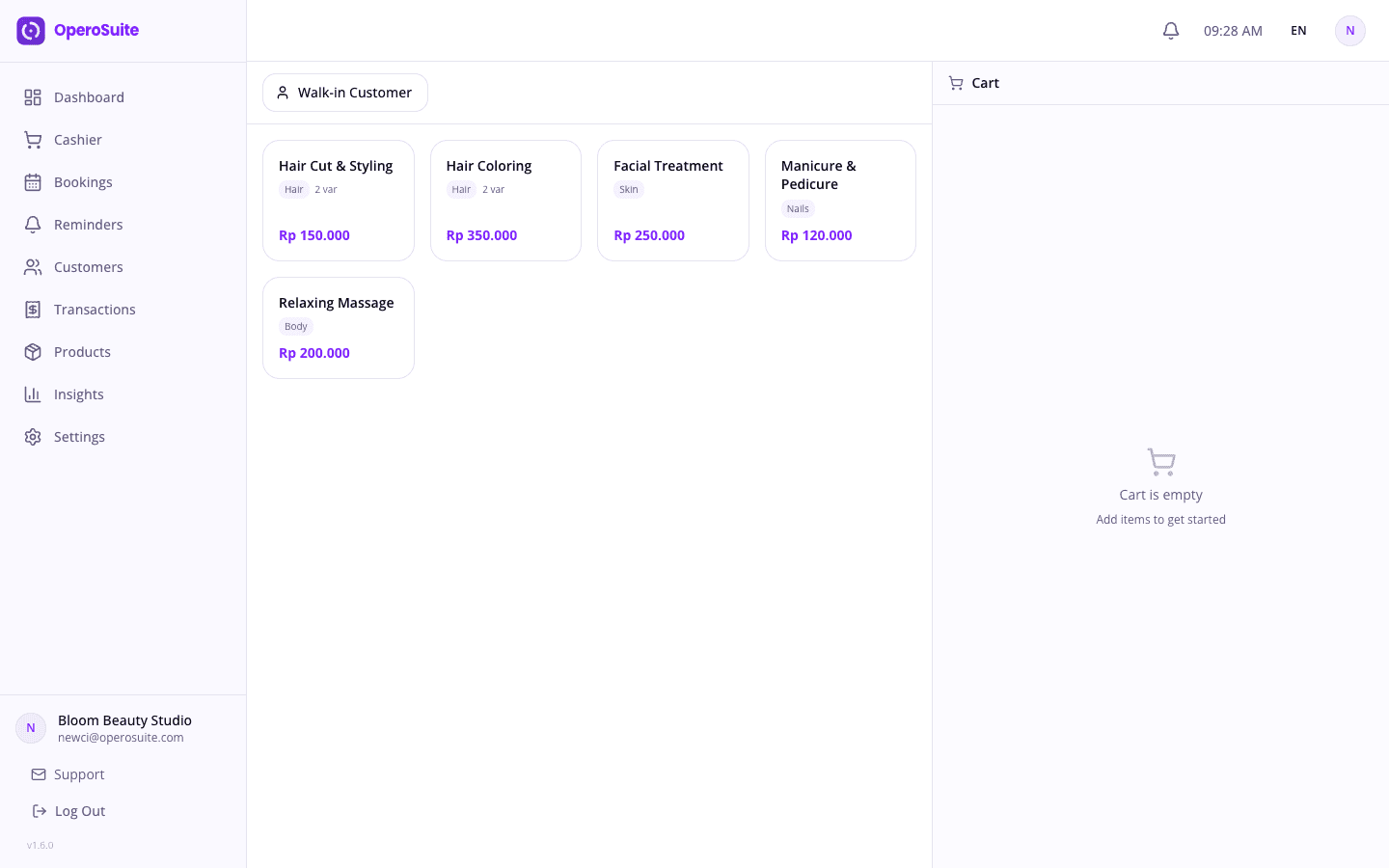
Lima tahun lalu kamu harus install software di komputer. Sekarang kasir kamu tinggal di cloud. Kalau kedengarannya kayak istilah teknis, ini artinya sebenarnya: data penjualan kamu, daftar produk kamu, laporan harian kamu — semuanya tinggal di server aman yang bisa kamu akses dari perangkat apa pun yang punya internet. Bukan di satu laptop yang bisa aja kena maling atau rusak.
Hal pertama yang berubah pas kamu pindah ke kasir cloud adalah proses setup-nya. Atau tepatnya, nggak adanya proses setup. Nggak ada CD yang harus dimasukin. Nggak ada installer yang harus di-download. Nggak perlu manggil orang IT. Kamu buka browser, ketik URL, bikin akun pakai email, dan kamu udah liat layar kasir kamu. Gitu aja. Kalau kamu bisa daftar Instagram, kamu bisa setup ini.
Hal kedua adalah data kamu. Mesin kasir tradisional nyimpen transaksi di alatnya langsung. Kalau mesinnya rusak, datanya hilang. Kalau ada yang numpahin kopi, hilang. Kalau kecurian pas malem, hilang. Kasir cloud nyimpen setiap transaksi begitu terjadi ke server jauh. Bahkan kalau HP kamu jatuh ke selokan — kejadian lebih sering dari yang kamu kira — data bisnis kamu aman. Login dari perangkat baru dan semuanya ada di sana, persis kayak yang kamu tinggalin.
Laporan real-time itu kelebihan ketiga dan mungkin yang paling ngubah cara kamu jalanin bisnis. Kamu selesai shift dan bisa liat pendapatan harian tanpa megang kalkulator atau buka Excel. Produk mana yang paling laku. Jam berapa yang paling rame. Berapa yang tunai versus QRIS versus transfer. Semua otomatis. Nggak ada lagi ngitung manual di akhir hari. Itu tiga puluh menit yang kamu dapet balik, setiap hari.
Akses multi-user itu sesuatu yang kebanyakan pemilik bisnis kecil nggak sadar mereka butuhin sampai mereka punya. Dengan kasir cloud, pemilik bisa cek penjualan hari ini dari rumah, di HP, sementara staf yang jaga konter. Mata tambahan tanpa harus ada di tempat. Kamu bisa nambah atau hapus karyawan, atur level izin yang beda-beda, dan lihat persis siapa yang handle transaksi mana.
Pertanyaan yang pasti muncul: gimana kalau internetnya mati? Pertanyaan yang valid dan jawabannya penting. Aplikasi kasir cloud yang bagus ngatasin mode offline dengan bener. OperoSuite bisa jalan offline — pas koneksi kamu putus, transaksi nyimpen lokal di perangkat. Begitu internet kamu nyala lagi, semuanya langsung nyambung otomatis ke server. Staf kamu tetep jualan. Aplikasinya nyusul pas bisa.
Sekarang kita jalanin pemakaian sehari-harinya karena setup cepet dan kamu mostly di sini buat yang terjadi setelahnya. Langkah satu: daftar pakai email dan password. Langkah dua: tambahin produk kamu — nama, harga, dan opsional foto. Kalau kamu jualan kopi, artinya kamu daftarin menu kamu sekali aja. Setelah itu, mereka muncul sebagai tombol di layar kasir kamu. Langkah tiga: mulai transaksi. Tap produk yang pelanggan pesan, aplikasi ngitung totalnya, pilih metode bayar, dan struknya siap. Transaksi pertama di bawah tiga puluh detik. Transaksi rutin, setelah produk udah disimpen, di bawah sepuluh detik.
Manajemen pelanggan udah built-in dan mostly otomatis. Pas pelanggan bayar, aplikasi nyimpen nama mereka (kalau kamu masukin) dan bangun riwayat kunjungan seiring waktu. Pelanggan tetap datang dan kamu bisa liat apa yang mereka pesan minggu lalu, seberapa sering mereka datang, dan total belanja mereka. Ini tipe data yang dulu butuh buku catatan dan ingatan bagus. Sekarang jalan sendiri.
Laporan tanpa Excel itu fitur yang kamu bakal bingung gimana caranya hidup tanpanya. Pendapatan harian, produk paling laku, jumlah transaksi per jam, rincian metode bayar — semuanya otomatis dan bisa dibaca di HP atau laptop. Nggak perlu ekspor ke CSV dan bikin pivot table. Kamu buka tab laporan dan angkanya udah ada di sana, update real-time pas transaksi terjadi.
Ngatur stok juga berubah dari nebak-nebak jadi pasti. Setiap kali produk kejual, jumlahnya turun satu. Atur notifikasi stok rendah dan aplikasi bakal kasih tahu kamu pas kamu mau kehabisan sesuatu sebelum pelanggan nanya dan kamu harus bilang maaf habis. Untuk warung makan kecil atau toko retail, ini aja udah cegah penjualan hilang setiap hari.
Soal biaya perlu dibahas langsung. Sistem POS tradisional sering nagih jutaan di depan buat hardware plus instalasi. Aplikasi kasir cloud jalan pakai model langganan. Kamu bayar bulanan dan itu nutupin semuanya — software, update, backup, support. Nggak ada hardware. Nggak ada biaya instalasi. Kalau nggak cocok, tinggal batalin. Nggak perlu uninstall. Nggak ada hardware nganggur di pojokan.
Buat liat lebih detail apa yang tersedia: aplikasi kasir online untuk bisnis kecil. OperoSuite mulai dari Rp 150,000 per bulan, jalan di perangkat apa pun yang punya browser, dan kamu bisa coba gratis dulu sebelum komit.
Cloud itu bukan sesuatu yang perlu ditakutin. Artinya data bisnis kamu lebih aman di server yang dijaga dengan backup otomatis dan enkripsi daripada di buku catatan sebelah mesin kasir atau di laptop yang ditaruh di bawah meja. Kalau perangkat kamu hilang besok, bisnis kamu nggak ikut hilang. Itu bukan janji teknologi. Itu ketenangan pikiran.